应用部署
`nginx+uwsgi+django<https://uwsgi-docs.readthedocs.io/en/latest/tutorials/Django_and_nginx.html>`_
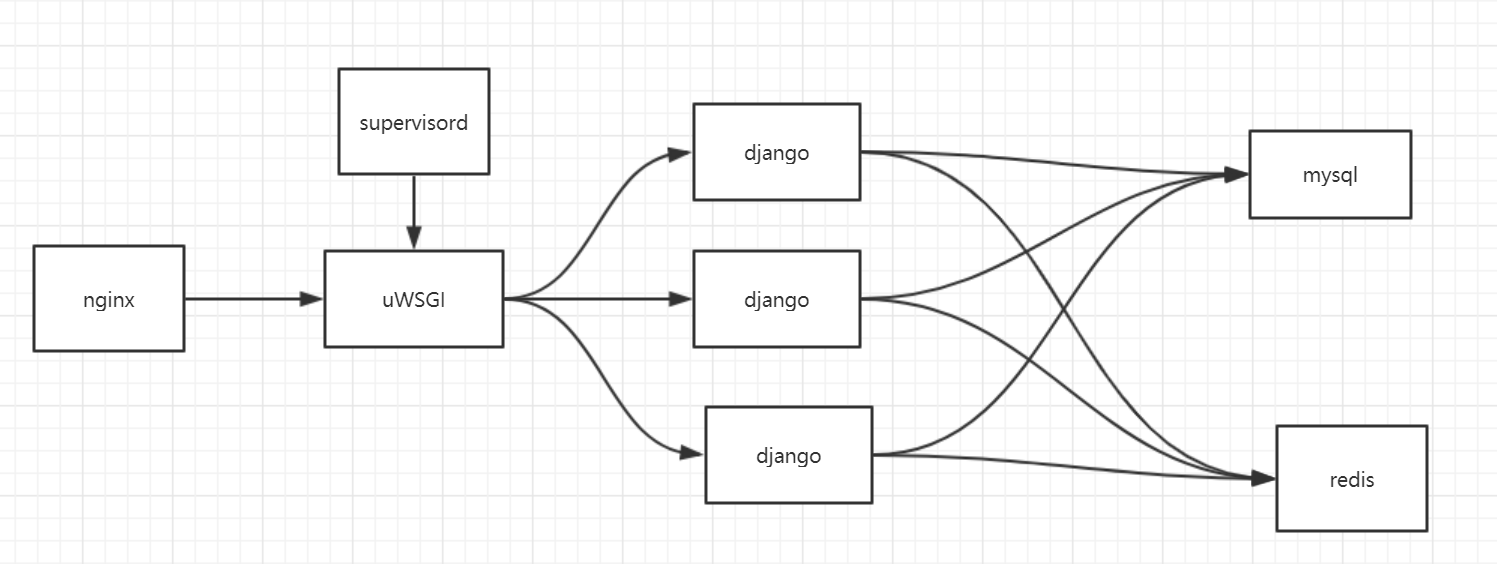
web部署框架
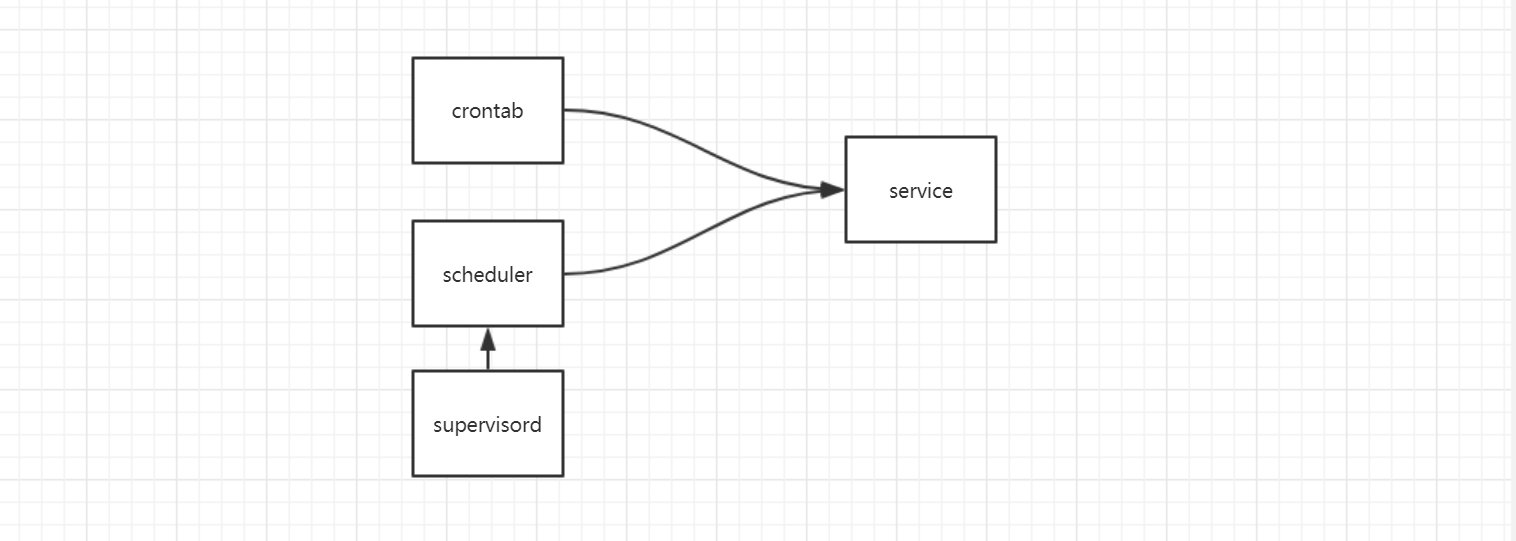
定时任务部署框架
web应用部署
1. 数据库配置
- ubuntu安装mysql apt-get update; apt-get install mysql-server
- 更改配置文件/etc/mysql/mysql.conf.d/mysqld.cnf 的参数 bind_address
- 刷新数据库权限
- 在django代码里面配置读写数据库
mysql启动出错解决方案
usermod -d /var/lib/mysql/ mysql
chown -R mysql:mysql /var/lib/mysql /var/run/mysqld
mysql连接错误
# 进入mysql终端
GRANT ALL PRIVILEGES ON *.* TO 'myuser'@'%' IDENTIFIED BY 'mypassword' WITH GRANT OPTION;
FLUSH   PRIVILEGES;
2. web服务器配置
uwsgi.ini配置
cat >>uwsgi.ini<<EOF
[uwsgi]
chdir = /project_dir
static-map = /static=/project_dir/staticfiles
module = wsgi:application
http = :8080
master = true
processes = 8
max-requests = 5000
vacuum = True
pid_file = order.pid
daemonize = /project/uwsgi.log
EOF

# 启动命令
uwsgi --ini uwsgi.ini

# 停止命令
uwsgi --stop order.pid
3. nginx配置
nginx配置 /etc/nginx/nginx.conf
http {

    ...

    upstream uwsgi {
                server 127.0.0.1:8000;
        }

    server {
            listen 80;
            charset utf-8;

            location / {
                    proxy_pass http://uwsgi;
                    }

            location /static {
                    alias /data/gic-order/order/staticfiles/;
                    }
    }
}

# 启动命令
service nginx restart
nginx -s reload
nginx搭建高可用服务器
反向代理两个服务器,当一个服务发生故障时,还可以使用另一个服务器
http {

    ...

    upstream uwsgi {
                # 反向代理两个服务器
                server 127.0.0.1:8000;
                server 127.0.0.1:8001;
        }

    server {
            listen 80;
            charset utf-8;

            location / {
                    proxy_pass http://uwsgi;
                    }

            location /static {
                    alias /data/gic-order/order/staticfiles/;
                    }
    }
}
定时任务部署
- 使用crontab
cat > usercron <<EOF
*/2 * * * * /usr/bin/python test.py
EOF

crontab -u root usercron
service cron restart
- 纯python,使用schedule
echo_supervisord_conf > supervisord_conf
cat >> supervisord_conf << EOF
[program:schedule]
command=/usr/bin/python test.py
autorestart=true
user=root
stdout_logfile=/data/scheduler.log
stderr_logfile=/data/scheduler_error.log
EOF

supervisord -c supervisord_conf
docker 配置文件
- python
FROM python:3.6

# 安装依赖
COPY .requirements.txt /tmp

RUN pip install -r /tmp/requirements.txt -i https://mirrors.aliyun.com/pypi/simple/
RUN apt-get update \
&& apt-get install -y cron \
&& apt-get install -y nginx \
&& ln -fs /usr/share/zoneinfo/Asia/Shanghai /etc/localtime

COPY . /data/gic-order
WORKDIR /data

EXPOSE 9088